mirror of
https://github.com/Security-Onion-Solutions/securityonion.git
synced 2026-03-09 06:15:34 +01:00
Compare commits
11 Commits
altwebcert
...
foxtrot
| Author | SHA1 | Date | |
|---|---|---|---|

|
9d8bae3183 | ||

|
7ac1e767ab | ||
|
|
2c4d833a5b | ||
|
|
41d3dd0aa5 | ||

|
6050ab6b21 | ||
|
|
ae05251359 | ||
|
|
f23158aed5 | ||
|
|
cbd98efaf4 | ||
|
|
1f7bf1fd88 | ||

|
b18fd591ac | ||
|
|
130cf279f9 |
4
.github/DISCUSSION_TEMPLATE/2-4.yml
vendored
4
.github/DISCUSSION_TEMPLATE/2-4.yml
vendored
@@ -2,13 +2,11 @@ body:
|
||||
- type: markdown
|
||||
attributes:
|
||||
value: |
|
||||
⚠️ This category is solely for conversations related to Security Onion 2.4 ⚠️
|
||||
|
||||
If your organization needs more immediate, enterprise grade professional support, with one-on-one virtual meetings and screensharing, contact us via our website: https://securityonion.com/support
|
||||
- type: dropdown
|
||||
attributes:
|
||||
label: Version
|
||||
description: Which version of Security Onion 2.4.x are you asking about?
|
||||
description: Which version of Security Onion are you asking about?
|
||||
options:
|
||||
-
|
||||
- 2.4.10
|
||||
|
||||
66
README.md
66
README.md
@@ -1,50 +1,58 @@
|
||||
## Security Onion 2.4
|
||||
<p align="center">
|
||||
<img src="https://securityonionsolutions.com/logo/logo-so-onion-dark.svg" width="400" alt="Security Onion Logo">
|
||||
</p>
|
||||
|
||||
Security Onion 2.4 is here!
|
||||
# Security Onion
|
||||
|
||||
## Screenshots
|
||||
Security Onion is a free and open Linux distribution for threat hunting, enterprise security monitoring, and log management. It includes a comprehensive suite of tools designed to work together to provide visibility into your network and host activity.
|
||||
|
||||
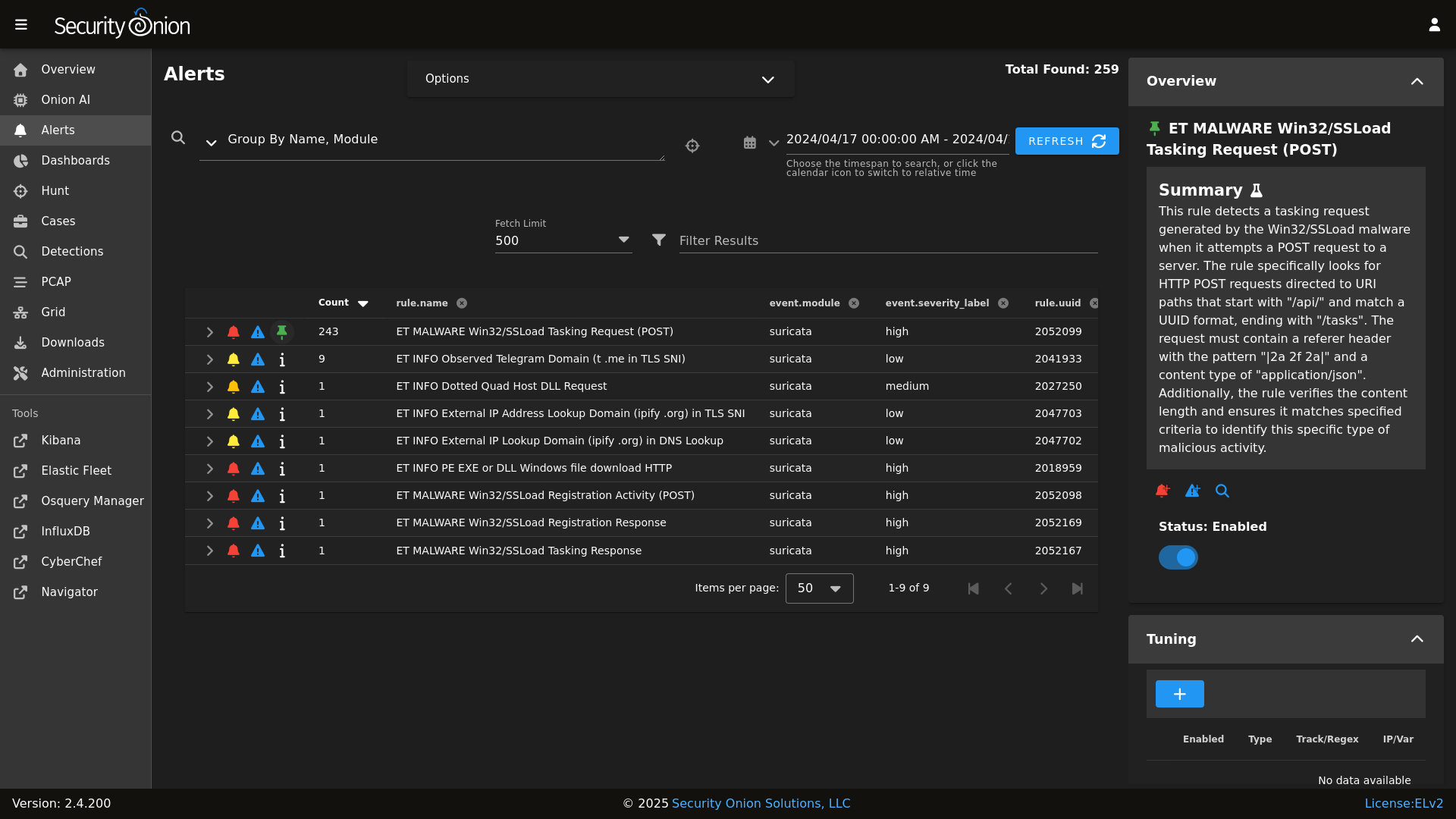
Alerts
|
||||
|
||||
## ✨ Features
|
||||
|
||||
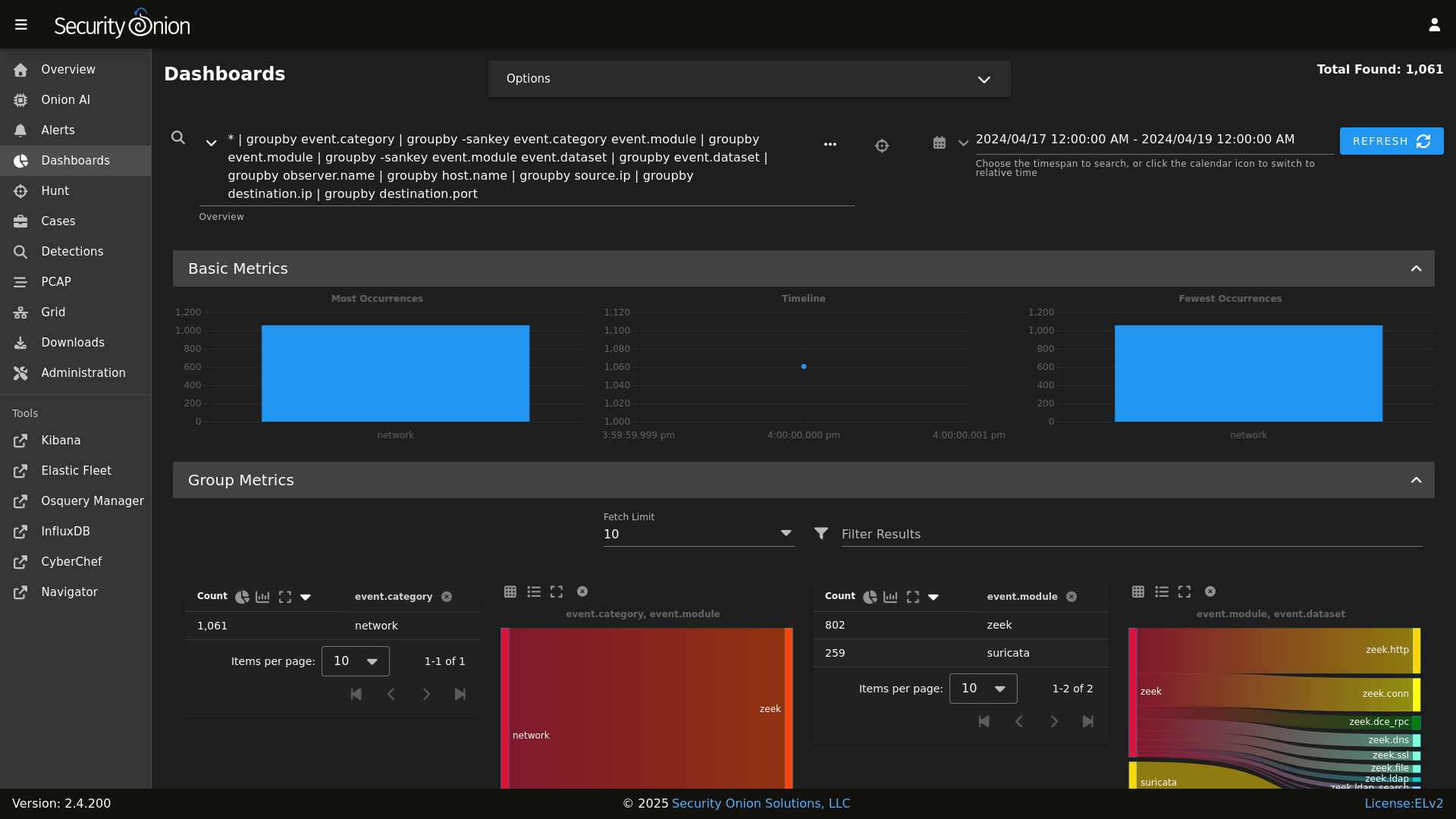
Dashboards
|
||||
|
||||
Security Onion includes everything you need to monitor your network and host systems:
|
||||
|
||||
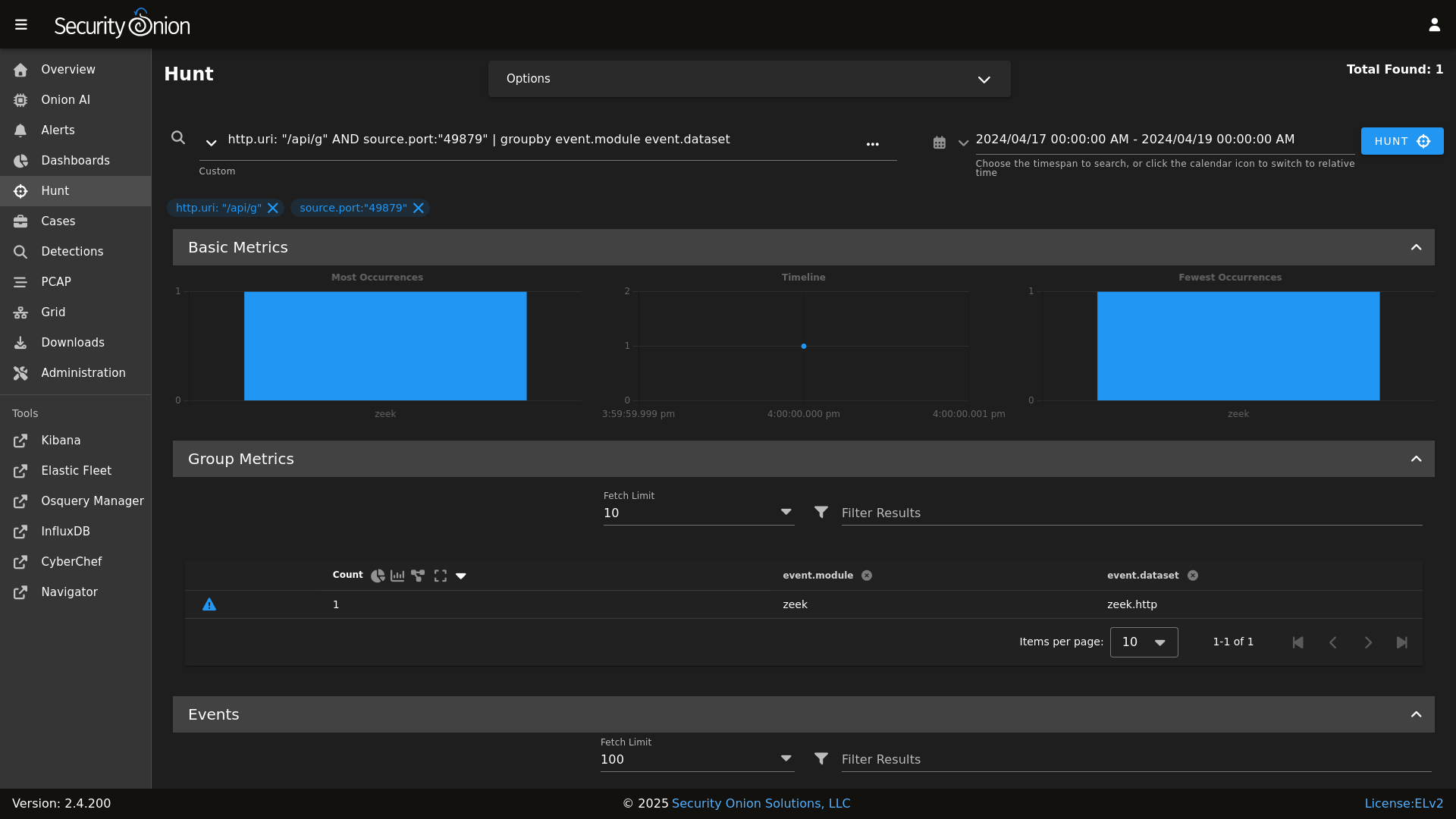
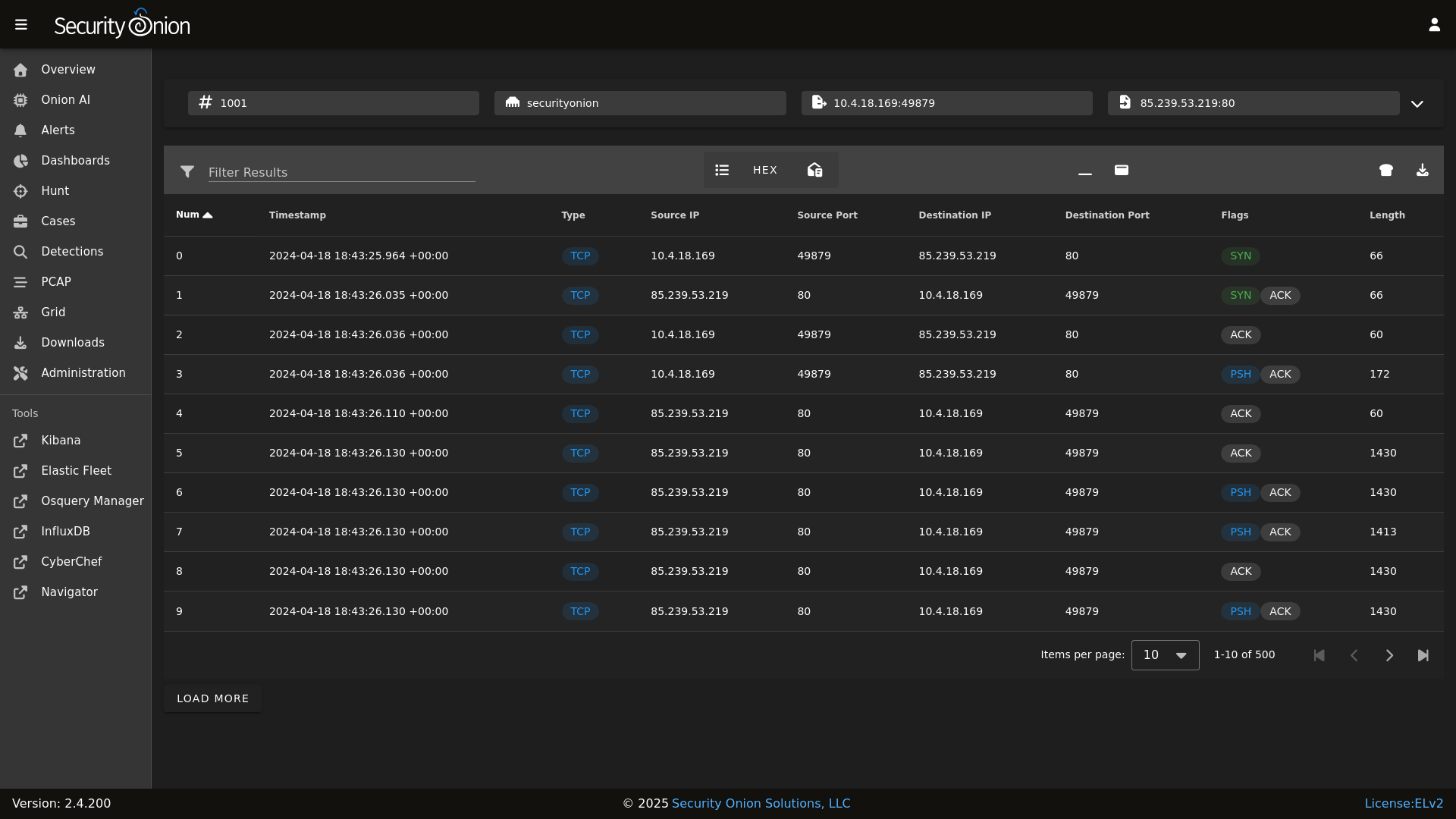
Hunt
|
||||
|
||||
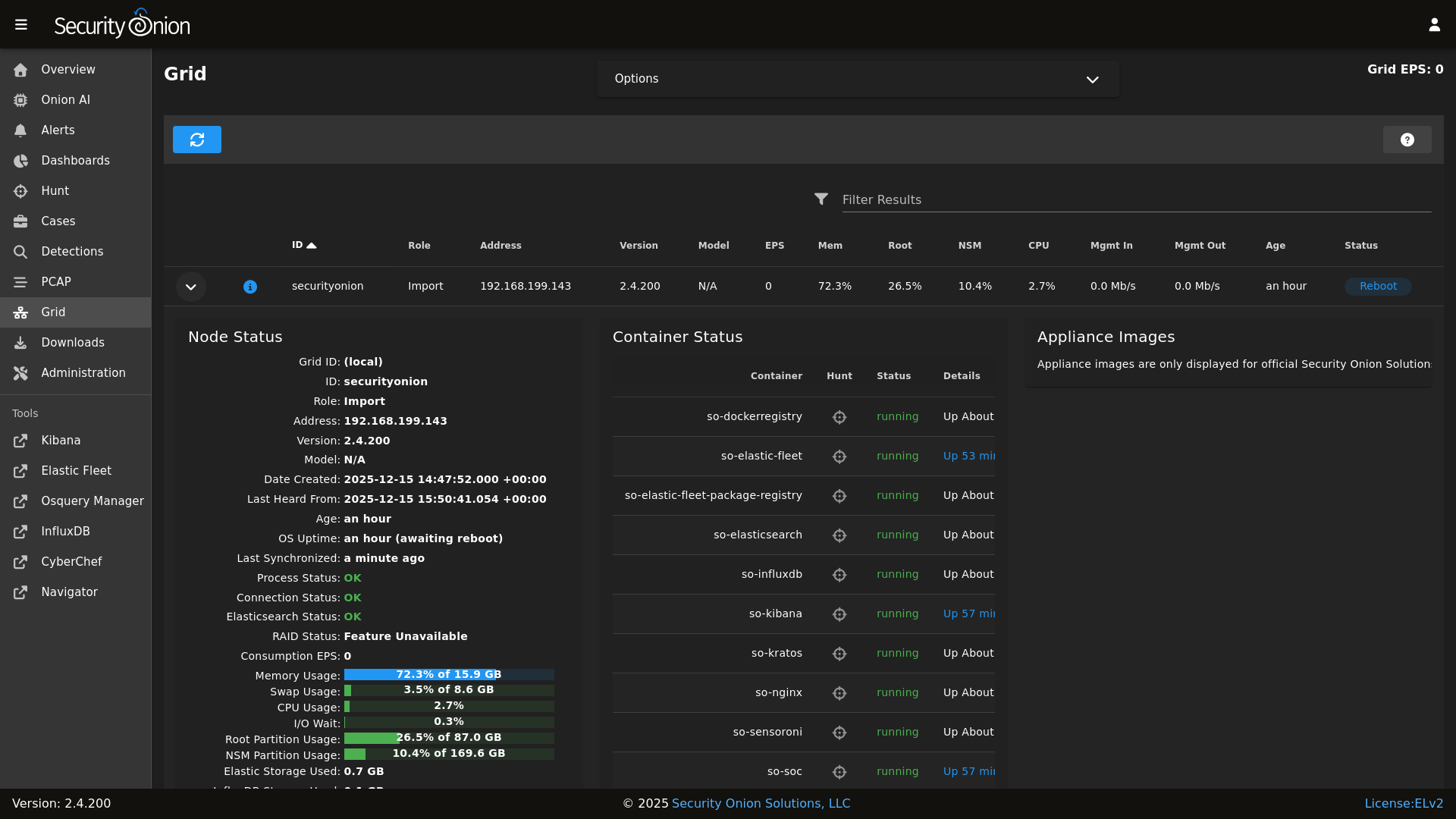
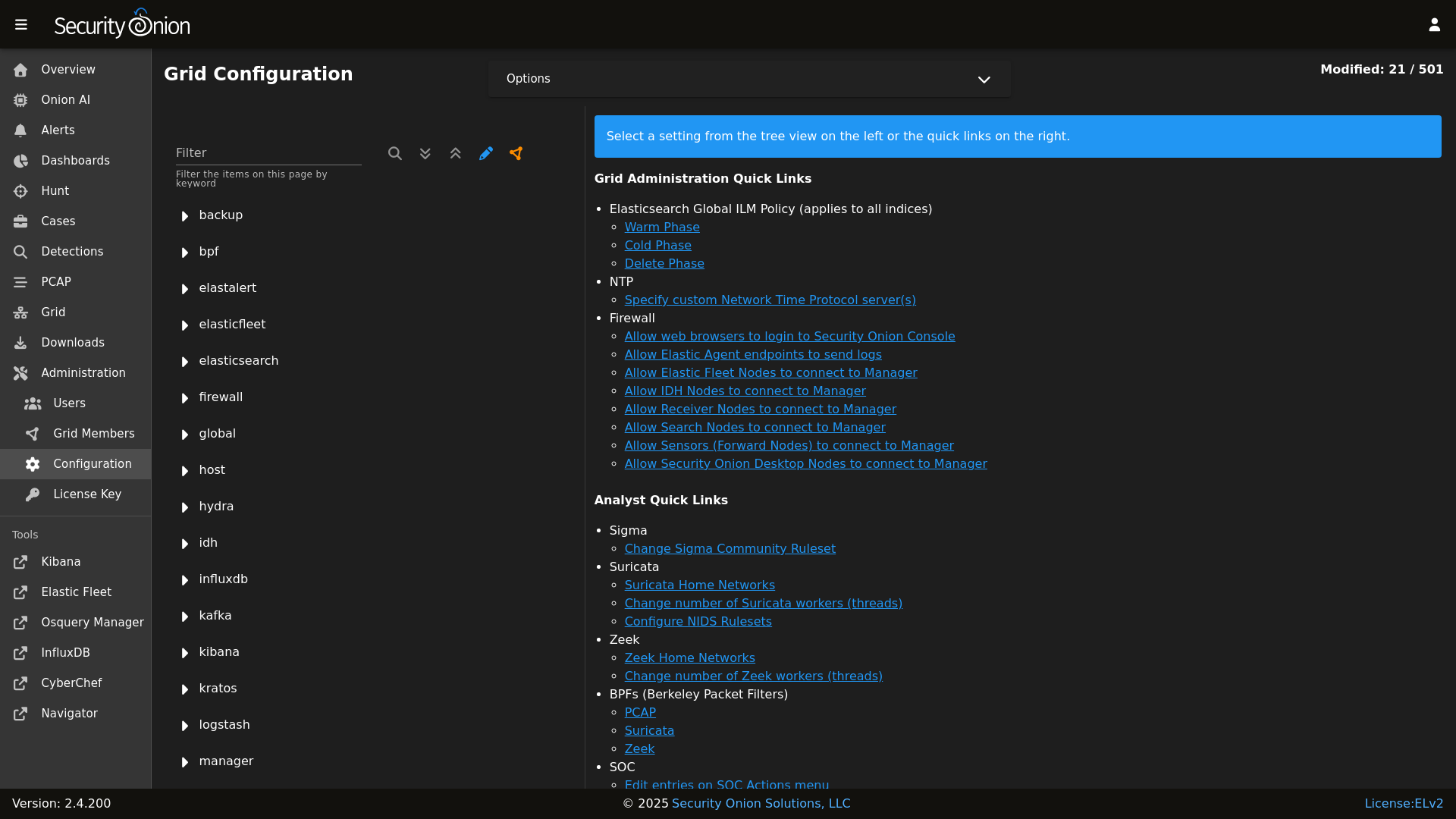
* **Security Onion Console (SOC)**: A unified web interface for analyzing security events and managing your grid.
|
||||
* **Elastic Stack**: Powerful search backed by Elasticsearch.
|
||||
* **Intrusion Detection**: Network-based IDS with Suricata and host-based monitoring with Elastic Fleet.
|
||||
* **Network Metadata**: Detailed network metadata generated by Zeek or Suricata.
|
||||
* **Full Packet Capture**: Retain and analyze raw network traffic with Suricata PCAP.
|
||||
|
||||
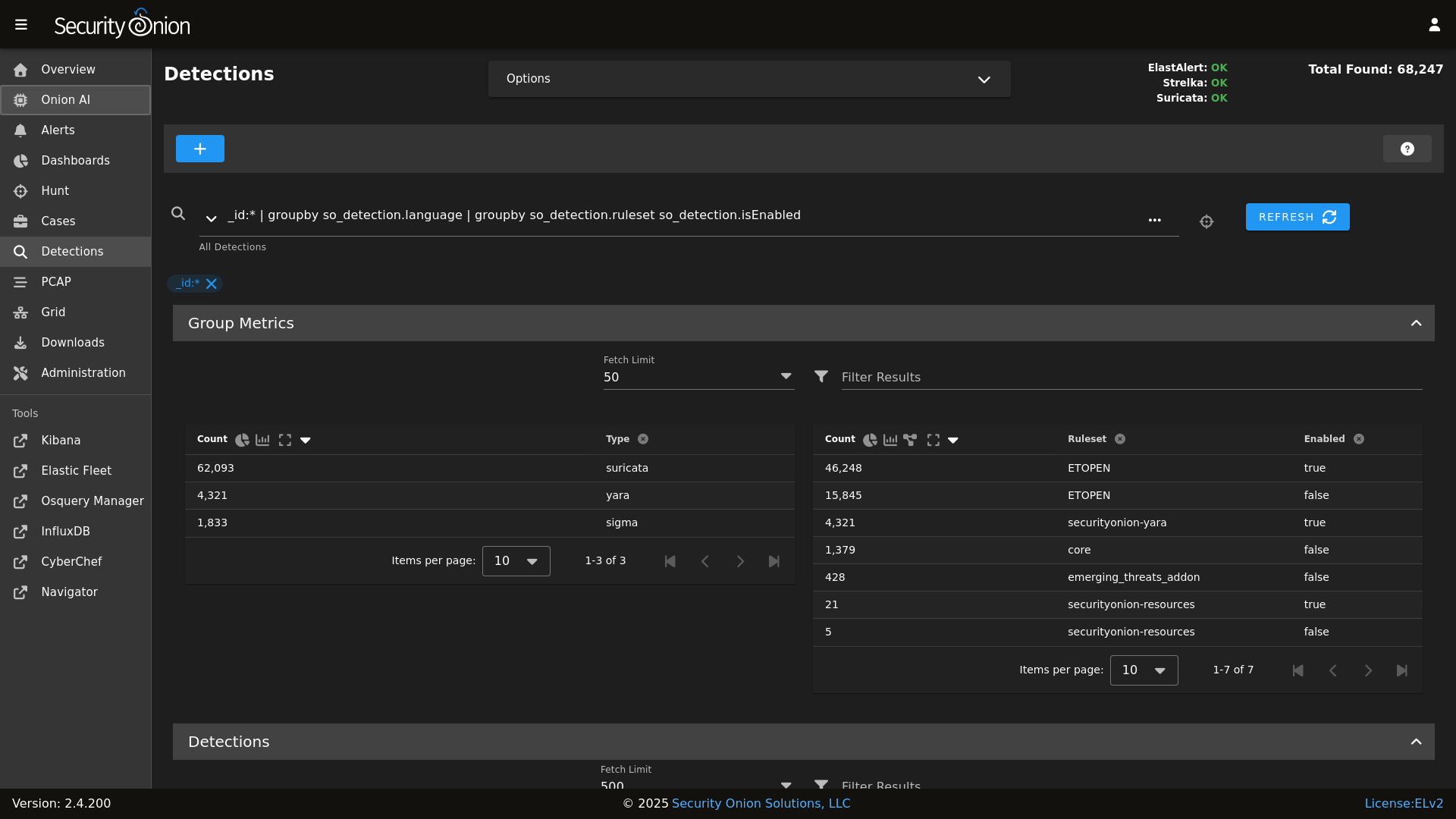
Detections
|
||||
|
||||
## ⭐ Security Onion Pro
|
||||
|
||||
PCAP
|
||||
|
||||
For organizations and enterprises requiring advanced capabilities, **Security Onion Pro** offers additional features designed for scale and efficiency:
|
||||
|
||||
Grid
|
||||
|
||||
* **Onion AI**: Leverage powerful AI-driven insights to accelerate your analysis and investigations.
|
||||
* **Enterprise Features**: Enhanced tools and integrations tailored for enterprise-grade security operations.
|
||||
|
||||
Config
|
||||
|
||||
For more information, visit the [Security Onion Pro](https://securityonionsolutions.com/pro) page.
|
||||
|
||||
### Release Notes
|
||||
## ☁️ Cloud Deployment
|
||||
|
||||
https://securityonion.net/docs/release-notes
|
||||
Security Onion is available and ready to deploy in the **AWS**, **Azure**, and **Google Cloud (GCP)** marketplaces.
|
||||
|
||||
### Requirements
|
||||
## 🚀 Getting Started
|
||||
|
||||
https://securityonion.net/docs/hardware
|
||||
| Goal | Resource |
|
||||
| :--- | :--- |
|
||||
| **Download** | [Security Onion ISO](https://securityonion.net/docs/download) |
|
||||
| **Requirements** | [Hardware Guide](https://securityonion.net/docs/hardware) |
|
||||
| **Install** | [Installation Instructions](https://securityonion.net/docs/installation) |
|
||||
| **What's New** | [Release Notes](https://securityonion.net/docs/release-notes) |
|
||||
|
||||
### Download
|
||||
## 📖 Documentation & Support
|
||||
|
||||
https://securityonion.net/docs/download
|
||||
For more detailed information, please visit our [Documentation](https://docs.securityonion.net).
|
||||
|
||||
### Installation
|
||||
* **FAQ**: [Frequently Asked Questions](https://securityonion.net/docs/faq)
|
||||
* **Community**: [Discussions & Support](https://securityonion.net/docs/community-support)
|
||||
* **Training**: [Official Training](https://securityonion.net/training)
|
||||
|
||||
https://securityonion.net/docs/installation
|
||||
## 🤝 Contributing
|
||||
|
||||
### FAQ
|
||||
We welcome contributions! Please see our [CONTRIBUTING.md](CONTRIBUTING.md) for guidelines on how to get involved.
|
||||
|
||||
https://securityonion.net/docs/faq
|
||||
## 🛡️ License
|
||||
|
||||
### Feedback
|
||||
Security Onion is licensed under the terms of the license found in the [LICENSE](LICENSE) file.
|
||||
|
||||
https://securityonion.net/docs/community-support
|
||||
---
|
||||
*Built with 🧅 by Security Onion Solutions.*
|
||||
|
||||
@@ -4,6 +4,7 @@
|
||||
|
||||
| Version | Supported |
|
||||
| ------- | ------------------ |
|
||||
| 3.x | :white_check_mark: |
|
||||
| 2.4.x | :white_check_mark: |
|
||||
| 2.3.x | :x: |
|
||||
| 16.04.x | :x: |
|
||||
|
||||
@@ -3,8 +3,6 @@
|
||||
# https://securityonion.net/license; you may not use this file except in compliance with the
|
||||
# Elastic License 2.0.
|
||||
|
||||
{% if '2.4' in salt['cp.get_file_str']('/etc/soversion') %}
|
||||
|
||||
{% import_yaml '/opt/so/saltstack/local/pillar/global/soc_global.sls' as SOC_GLOBAL %}
|
||||
{% if SOC_GLOBAL.global.airgap %}
|
||||
{% set UPDATE_DIR='/tmp/soagupdate/SecurityOnion' %}
|
||||
@@ -120,23 +118,3 @@ copy_bootstrap-salt_sbin:
|
||||
- source: {{UPDATE_DIR}}/salt/salt/scripts/bootstrap-salt.sh
|
||||
- force: True
|
||||
- preserve: True
|
||||
|
||||
{# this is added in 2.4.120 to remove salt repo files pointing to saltproject.io to accomodate the move to broadcom and new bootstrap-salt script #}
|
||||
{% if salt['pkg.version_cmp'](SOVERSION, '2.4.120') == -1 %}
|
||||
{% set saltrepofile = '/etc/yum.repos.d/salt.repo' %}
|
||||
{% if grains.os_family == 'Debian' %}
|
||||
{% set saltrepofile = '/etc/apt/sources.list.d/salt.list' %}
|
||||
{% endif %}
|
||||
remove_saltproject_io_repo_manager:
|
||||
file.absent:
|
||||
- name: {{ saltrepofile }}
|
||||
{% endif %}
|
||||
|
||||
{% else %}
|
||||
fix_23_soup_sbin:
|
||||
cmd.run:
|
||||
- name: curl -s -f -o /usr/sbin/soup https://raw.githubusercontent.com/Security-Onion-Solutions/securityonion/2.3/main/salt/common/tools/sbin/soup
|
||||
fix_23_soup_salt:
|
||||
cmd.run:
|
||||
- name: curl -s -f -o /opt/so/saltstack/defalt/salt/common/tools/sbin/soup https://raw.githubusercontent.com/Security-Onion-Solutions/securityonion/2.3/main/salt/common/tools/sbin/soup
|
||||
{% endif %}
|
||||
|
||||
@@ -333,8 +333,8 @@ get_elastic_agent_vars() {
|
||||
|
||||
if [ -f "$defaultsfile" ]; then
|
||||
ELASTIC_AGENT_TARBALL_VERSION=$(egrep " +version: " $defaultsfile | awk -F: '{print $2}' | tr -d '[:space:]')
|
||||
ELASTIC_AGENT_URL="https://repo.securityonion.net/file/so-repo/prod/2.4/elasticagent/elastic-agent_SO-$ELASTIC_AGENT_TARBALL_VERSION.tar.gz"
|
||||
ELASTIC_AGENT_MD5_URL="https://repo.securityonion.net/file/so-repo/prod/2.4/elasticagent/elastic-agent_SO-$ELASTIC_AGENT_TARBALL_VERSION.md5"
|
||||
ELASTIC_AGENT_URL="https://repo.securityonion.net/file/so-repo/prod/3/elasticagent/elastic-agent_SO-$ELASTIC_AGENT_TARBALL_VERSION.tar.gz"
|
||||
ELASTIC_AGENT_MD5_URL="https://repo.securityonion.net/file/so-repo/prod/3/elasticagent/elastic-agent_SO-$ELASTIC_AGENT_TARBALL_VERSION.md5"
|
||||
ELASTIC_AGENT_FILE="/nsm/elastic-fleet/artifacts/elastic-agent_SO-$ELASTIC_AGENT_TARBALL_VERSION.tar.gz"
|
||||
ELASTIC_AGENT_MD5="/nsm/elastic-fleet/artifacts/elastic-agent_SO-$ELASTIC_AGENT_TARBALL_VERSION.md5"
|
||||
ELASTIC_AGENT_EXPANSION_DIR=/nsm/elastic-fleet/artifacts/beats/elastic-agent
|
||||
|
||||
@@ -1,2 +1,2 @@
|
||||
https://repo.securityonion.net/file/so-repo/prod/2.4/oracle/9
|
||||
https://repo-alt.securityonion.net/prod/2.4/oracle/9
|
||||
https://repo.securityonion.net/file/so-repo/prod/3/oracle/9
|
||||
https://repo-alt.securityonion.net/prod/3/oracle/9
|
||||
@@ -143,7 +143,7 @@ show_usage() {
|
||||
echo " -v Show verbose output (files changed/added/deleted)"
|
||||
echo " -vv Show very verbose output (includes file diffs)"
|
||||
echo " --test Test mode - show what would change without making changes"
|
||||
echo " branch Git branch to checkout (default: 2.4/main)"
|
||||
echo " branch Git branch to checkout (default: 3/main)"
|
||||
echo ""
|
||||
echo "Examples:"
|
||||
echo " $0 # Normal operation"
|
||||
@@ -193,7 +193,7 @@ done
|
||||
|
||||
# Set default branch if not provided
|
||||
if [ -z "$BRANCH" ]; then
|
||||
BRANCH=2.4/main
|
||||
BRANCH=3/main
|
||||
fi
|
||||
|
||||
got_root
|
||||
|
||||
@@ -1,184 +0,0 @@
|
||||
#!/bin/bash
|
||||
|
||||
# Copyright Security Onion Solutions LLC and/or licensed to Security Onion Solutions LLC under one
|
||||
# or more contributor license agreements. Licensed under the Elastic License 2.0 as shown at
|
||||
# https://securityonion.net/license; you may not use this file except in compliance with the
|
||||
# Elastic License 2.0.
|
||||
|
||||
|
||||
. /usr/sbin/so-common
|
||||
|
||||
UPDATE_URL=https://raw.githubusercontent.com/Security-Onion-Solutions/securityonion/refs/heads/3/main/VERSION
|
||||
|
||||
# Check if already running version 3
|
||||
CURRENT_VERSION=$(cat /etc/soversion 2>/dev/null)
|
||||
if [[ "$CURRENT_VERSION" =~ ^3\. ]]; then
|
||||
echo ""
|
||||
echo "========================================================================="
|
||||
echo " Already Running Security Onion 3"
|
||||
echo "========================================================================="
|
||||
echo ""
|
||||
echo " This system is already running Security Onion $CURRENT_VERSION."
|
||||
echo " Use 'soup' to update within the 3.x release line."
|
||||
echo ""
|
||||
exit 0
|
||||
fi
|
||||
|
||||
echo ""
|
||||
echo "Checking PCAP settings."
|
||||
echo ""
|
||||
|
||||
# Check pcapengine setting - must be SURICATA before upgrading to version 3
|
||||
PCAP_ENGINE=$(lookup_pillar "pcapengine")
|
||||
|
||||
PCAP_DELETED=false
|
||||
|
||||
prompt_delete_pcap() {
|
||||
read -rp " Would you like to delete all remaining Stenographer PCAP data? (y/N): " DELETE_PCAP
|
||||
if [[ "$DELETE_PCAP" =~ ^[Yy]$ ]]; then
|
||||
echo ""
|
||||
echo " WARNING: This will permanently delete all Stenographer PCAP data"
|
||||
echo " on all nodes. This action cannot be undone."
|
||||
echo ""
|
||||
read -rp " Are you sure? (y/N): " CONFIRM_DELETE
|
||||
if [[ "$CONFIRM_DELETE" =~ ^[Yy]$ ]]; then
|
||||
echo ""
|
||||
echo " Deleting Stenographer PCAP data on all nodes..."
|
||||
salt '*' cmd.run "rm -rf /nsm/pcap/* && rm -rf /nsm/pcapindex/*"
|
||||
echo " Done."
|
||||
PCAP_DELETED=true
|
||||
else
|
||||
echo ""
|
||||
echo " Delete cancelled."
|
||||
fi
|
||||
fi
|
||||
}
|
||||
|
||||
pcapengine_not_changed() {
|
||||
echo ""
|
||||
echo " PCAP engine must be set to SURICATA before upgrading to Security Onion 3."
|
||||
echo " You can change this in SOC by navigating to:"
|
||||
echo " Configuration -> global -> pcapengine"
|
||||
}
|
||||
|
||||
prompt_change_engine() {
|
||||
local current_engine=$1
|
||||
echo ""
|
||||
read -rp " Would you like to change the PCAP engine to SURICATA now? (y/N): " CHANGE_ENGINE
|
||||
if [[ "$CHANGE_ENGINE" =~ ^[Yy]$ ]]; then
|
||||
if [[ "$PCAP_DELETED" != "true" ]]; then
|
||||
echo ""
|
||||
echo " WARNING: Stenographer PCAP data was not deleted. If you proceed,"
|
||||
echo " this data will no longer be accessible through SOC and will never"
|
||||
echo " be automatically deleted. You will need to manually remove it later."
|
||||
echo ""
|
||||
read -rp " Continue with changing pcapengine to SURICATA? (y/N): " CONFIRM_CHANGE
|
||||
if [[ ! "$CONFIRM_CHANGE" =~ ^[Yy]$ ]]; then
|
||||
pcapengine_not_changed
|
||||
return 1
|
||||
fi
|
||||
fi
|
||||
echo ""
|
||||
echo " Updating PCAP engine to SURICATA..."
|
||||
so-yaml.py replace /opt/so/saltstack/local/pillar/global/soc_global.sls global.pcapengine SURICATA
|
||||
echo " Done."
|
||||
return 0
|
||||
else
|
||||
pcapengine_not_changed
|
||||
return 1
|
||||
fi
|
||||
}
|
||||
|
||||
case "$PCAP_ENGINE" in
|
||||
SURICATA)
|
||||
echo "PCAP engine settings OK."
|
||||
;;
|
||||
TRANSITION|STENO)
|
||||
echo ""
|
||||
echo "========================================================================="
|
||||
echo " PCAP Engine Check Failed"
|
||||
echo "========================================================================="
|
||||
echo ""
|
||||
echo " Your PCAP engine is currently set to $PCAP_ENGINE."
|
||||
echo ""
|
||||
echo " Before upgrading to Security Onion 3, Stenographer PCAP data must be"
|
||||
echo " removed and the PCAP engine must be set to SURICATA."
|
||||
echo ""
|
||||
echo " To check remaining Stenographer PCAP usage, run:"
|
||||
echo " salt '*' cmd.run 'du -sh /nsm/pcap'"
|
||||
echo ""
|
||||
|
||||
prompt_delete_pcap
|
||||
if ! prompt_change_engine "$PCAP_ENGINE"; then
|
||||
echo ""
|
||||
exit 1
|
||||
fi
|
||||
;;
|
||||
*)
|
||||
echo ""
|
||||
echo "========================================================================="
|
||||
echo " PCAP Engine Check Failed"
|
||||
echo "========================================================================="
|
||||
echo ""
|
||||
echo " Unable to determine the PCAP engine setting (got: '$PCAP_ENGINE')."
|
||||
echo " Please ensure the PCAP engine is set to SURICATA."
|
||||
echo " In SOC, navigate to Configuration -> global -> pcapengine"
|
||||
echo " and change the value to SURICATA."
|
||||
echo ""
|
||||
exit 1
|
||||
;;
|
||||
esac
|
||||
|
||||
echo ""
|
||||
echo "Checking Versions."
|
||||
echo ""
|
||||
|
||||
# Check if Security Onion 3 has been released
|
||||
VERSION=$(curl -sSf "$UPDATE_URL" 2>/dev/null)
|
||||
|
||||
if [[ -z "$VERSION" ]]; then
|
||||
echo ""
|
||||
echo "========================================================================="
|
||||
echo " Unable to Check Version"
|
||||
echo "========================================================================="
|
||||
echo ""
|
||||
echo " Could not retrieve version information from:"
|
||||
echo " $UPDATE_URL"
|
||||
echo ""
|
||||
echo " Please check your network connection and try again."
|
||||
echo ""
|
||||
exit 1
|
||||
fi
|
||||
|
||||
if [[ "$VERSION" == "UNRELEASED" ]]; then
|
||||
echo ""
|
||||
echo "========================================================================="
|
||||
echo " Security Onion 3 Not Available"
|
||||
echo "========================================================================="
|
||||
echo ""
|
||||
echo " Security Onion 3 has not been released yet."
|
||||
echo ""
|
||||
echo " Please check back later or visit https://securityonion.net for updates."
|
||||
echo ""
|
||||
exit 1
|
||||
fi
|
||||
|
||||
# Validate version format (e.g., 3.0.2)
|
||||
if [[ ! "$VERSION" =~ ^[0-9]+\.[0-9]+\.[0-9]+$ ]]; then
|
||||
echo ""
|
||||
echo "========================================================================="
|
||||
echo " Invalid Version"
|
||||
echo "========================================================================="
|
||||
echo ""
|
||||
echo " Received unexpected version format: '$VERSION'"
|
||||
echo ""
|
||||
echo " Please check back later or visit https://securityonion.net for updates."
|
||||
echo ""
|
||||
exit 1
|
||||
fi
|
||||
|
||||
echo "Security Onion 3 ($VERSION) is available. Upgrading..."
|
||||
echo ""
|
||||
|
||||
# All checks passed - proceed with upgrade
|
||||
BRANCH=3/main soup
|
||||
@@ -22,18 +22,6 @@ include:
|
||||
{% endif %}
|
||||
|
||||
{% if INSTALLEDSALTVERSION|string != SALTVERSION|string %}
|
||||
|
||||
{# this is added in 2.4.120 to remove salt repo files pointing to saltproject.io to accomodate the move to broadcom and new bootstrap-salt script #}
|
||||
{% if salt['pkg.version_cmp'](GLOBALS.so_version, '2.4.120') == -1 %}
|
||||
{% set saltrepofile = '/etc/yum.repos.d/salt.repo' %}
|
||||
{% if grains.os_family == 'Debian' %}
|
||||
{% set saltrepofile = '/etc/apt/sources.list.d/salt.list' %}
|
||||
{% endif %}
|
||||
remove_saltproject_io_repo_minion:
|
||||
file.absent:
|
||||
- name: {{ saltrepofile }}
|
||||
{% endif %}
|
||||
|
||||
unhold_salt_packages:
|
||||
pkg.unheld:
|
||||
- pkgs:
|
||||
|
||||
@@ -14,7 +14,7 @@ An API key or User Credentials is necessary for utilizing Elasticsearch.
|
||||
|
||||
In SOC, navigate to `Administration`, toggle `Show all configurable settings, including advanced settings.`, and navigate to `sensoroni` -> `analyzers` -> `elasticsearch`.
|
||||
|
||||

|
||||

|
||||
|
||||
|
||||
The following configuration options are available for:
|
||||
|
||||
@@ -6,7 +6,7 @@ Submit a base64-encoded EML file to Sublime Platform for analysis.
|
||||
## Configuration Requirements
|
||||
In SOC, navigate to `Administration`, toggle `Show all configurable settings, including advanced settings.`, and navigate to `sensoroni` -> `analyzers` -> `sublime_platform`.
|
||||
|
||||

|
||||

|
||||
|
||||
|
||||
The following configuration options are available for:
|
||||
|
||||
@@ -47,7 +47,7 @@ telegraf_key_perms:
|
||||
- group: 939
|
||||
|
||||
{% if not GLOBALS.is_manager %}
|
||||
{# Prior to 2.4.220, minions used influxdb.crt and key for telegraf #}
|
||||
{# Prior to 2.4.210, minions used influxdb.crt and key for telegraf #}
|
||||
remove_influxdb.crt:
|
||||
file.absent:
|
||||
- name: /etc/pki/influxdb.crt
|
||||
|
||||
@@ -1798,8 +1798,8 @@ securityonion_repo() {
|
||||
if ! $is_desktop_grid; then
|
||||
gpg_rpm_import
|
||||
if [[ ! $is_airgap ]]; then
|
||||
echo "https://repo.securityonion.net/file/so-repo/prod/2.4/oracle/9" > /etc/yum/mirror.txt
|
||||
echo "https://so-repo-east.s3.us-east-005.backblazeb2.com/prod/2.4/oracle/9" >> /etc/yum/mirror.txt
|
||||
echo "https://repo.securityonion.net/file/so-repo/prod/3/oracle/9" > /etc/yum/mirror.txt
|
||||
echo "https://so-repo-east.s3.us-east-005.backblazeb2.com/prod/3/oracle/9" >> /etc/yum/mirror.txt
|
||||
echo "[main]" > /etc/yum.repos.d/securityonion.repo
|
||||
echo "gpgcheck=1" >> /etc/yum.repos.d/securityonion.repo
|
||||
echo "installonly_limit=3" >> /etc/yum.repos.d/securityonion.repo
|
||||
@@ -1857,8 +1857,8 @@ repo_sync_local() {
|
||||
info "Adding Repo Download Configuration"
|
||||
mkdir -p /nsm/repo
|
||||
mkdir -p /opt/so/conf/reposync/cache
|
||||
echo "https://repo.securityonion.net/file/so-repo/prod/2.4/oracle/9" > /opt/so/conf/reposync/mirror.txt
|
||||
echo "https://repo-alt.securityonion.net/prod/2.4/oracle/9" >> /opt/so/conf/reposync/mirror.txt
|
||||
echo "https://repo.securityonion.net/file/so-repo/prod/3/oracle/9" > /opt/so/conf/reposync/mirror.txt
|
||||
echo "https://repo-alt.securityonion.net/prod/3/oracle/9" >> /opt/so/conf/reposync/mirror.txt
|
||||
echo "[main]" > /opt/so/conf/reposync/repodownload.conf
|
||||
echo "gpgcheck=1" >> /opt/so/conf/reposync/repodownload.conf
|
||||
echo "installonly_limit=3" >> /opt/so/conf/reposync/repodownload.conf
|
||||
@@ -1895,7 +1895,7 @@ repo_sync_local() {
|
||||
logCmd "dnf -y install epel-release"
|
||||
fi
|
||||
dnf install -y yum-utils device-mapper-persistent-data lvm2
|
||||
curl -fsSL https://repo.securityonion.net/file/so-repo/prod/2.4/so/so.repo | tee /etc/yum.repos.d/so.repo
|
||||
curl -fsSL https://repo.securityonion.net/file/so-repo/prod/3/so/so.repo | tee /etc/yum.repos.d/so.repo
|
||||
rpm --import https://packages.broadcom.com/artifactory/api/security/keypair/SaltProjectKey/public
|
||||
dnf config-manager --add-repo https://download.docker.com/linux/centos/docker-ce.repo
|
||||
curl -fsSL "https://github.com/saltstack/salt-install-guide/releases/latest/download/salt.repo" | tee /etc/yum.repos.d/salt.repo
|
||||
|
||||
Reference in New Issue
Block a user