
# About Hayabusa
Hayabusa is a **Windows event log fast forensics timeline generator** and **threat hunting tool** created by the [Yamato Security](https://yamatosecurity.connpass.com/) group in Japan. Hayabusa means ["peregrine falcon"](https://en.wikipedia.org/wiki/Peregrine_falcon") in Japanese and was chosen as peregrine falcons are the fastest animal in the world, great at hunting and highly trainable. It is written in [Rust](https://www.rust-lang.org/) and supports multi-threading in order to be as fast as possible. We have provided a [tool](https://github.com/Yamato-Security/hayabusa/tree/main/tools/sigmac) to convert [sigma](https://github.com/SigmaHQ/sigma) rules into hayabusa rule format. The hayabusa detection rules, like sigma, are also written in YML in order to be as easily customizable and extensible as possible. It can be run either on running systems for live analysis or by gathering logs from multiple systems for offline analysis. (At the moment, it does not support real-time alerting or periodic scans.) The output will be consolidated into a single CSV timeline for easy analysis in Excel or [Timeline Explorer](https://ericzimmerman.github.io/#!index.md).
## Main goals
### Threat hunting
Hayabusa currently has over 1000 sigma rules and around 50 hayabusa rules with more rules being added regularly. The ultimate goal is to be able to push out hayabusa agents to all Windows endpoints after an incident or for periodic threat hunting and have them alert back to a central server.
### Fast forensics timeline generation
Windows event log analysis has traditionally been a very long and tedious process because Windows event logs are 1) in a data format that is hard to analyze and 2) the majority of data is noise and not useful for investigations. Hayabusa's main goal is to extract out only useful data and present it in an easy-to-read format that is usable not only by professionally trained analysts but any Windows system administrator.
Hayabusa is not intended to be a replacement for tools like [Evtx Explorer](https://ericzimmerman.github.io/#!index.md) or [Event Log Explorer](https://eventlogxp.com/) for more deep-dive analysis but is intended for letting analysts get 80% of their work done in 20% of the time.
# About the development
First inspired by the [DeepBlueCLI](https://github.com/sans-blue-team/DeepBlueCLI) Windows event log analyzer, we started in 2020 porting it over to Rust for the [RustyBlue](https://github.com/Yamato-Security/RustyBlue) project, then created sigma-like flexible detection signatures written in YML, and then added a backend to sigma to support converting sigma rules into our hayabusa rule format.
# Screenshots
## Startup:

## Terminal output:

## Results summary:

## Analysis in Excel:

## Analysis in Timeline Explorer:

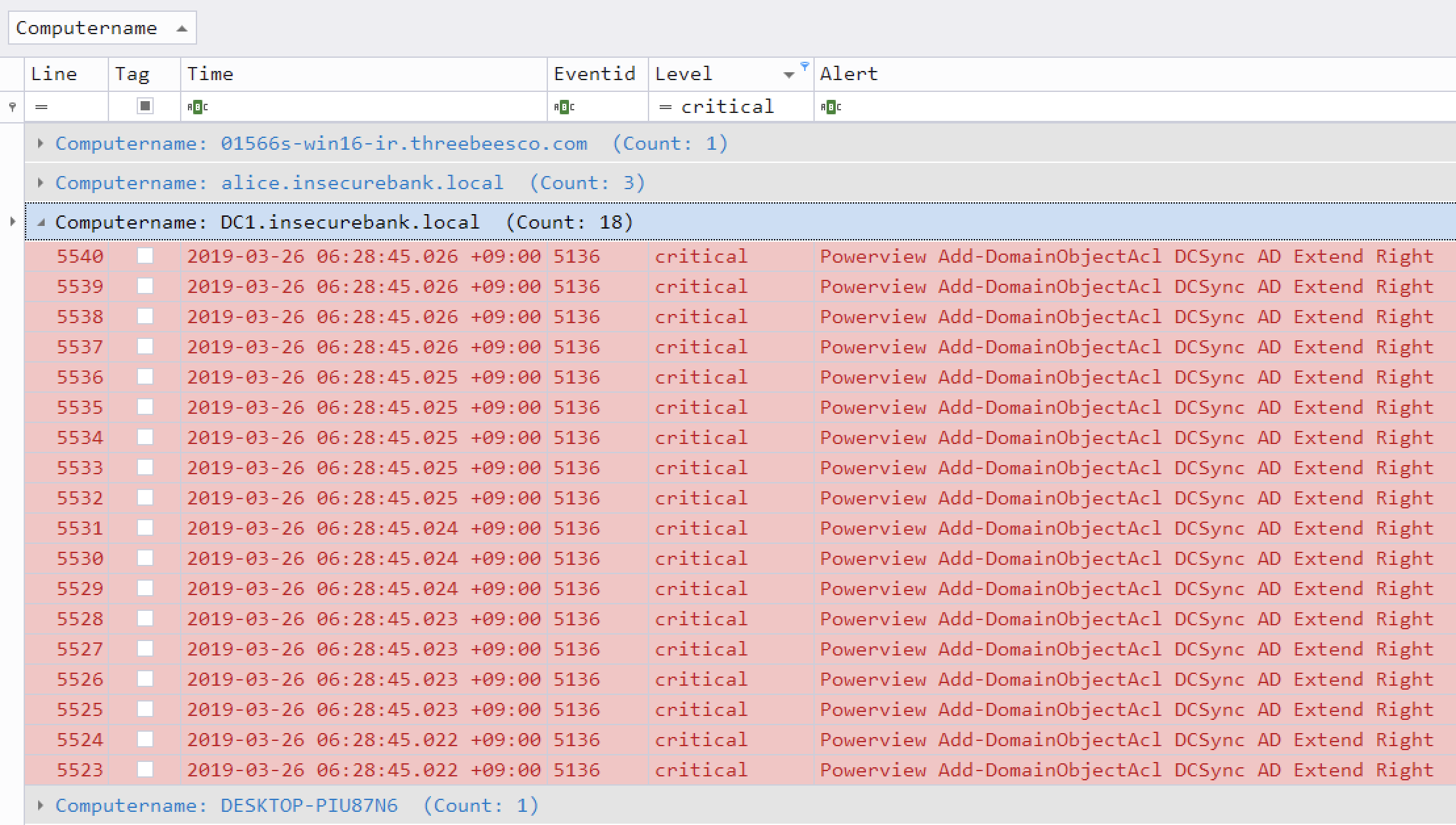
## Critical alert filtering and computer grouping in Timeline Explorer:
# Features
* Cross-platform support: Windows, Linux, macOS
* Developed in Rust to be memory safe and faster than a hayabusa falcon!
* Multi-thread support delivering up to a 5x speed improvement!
* Creates a single easy-to-analyze CSV timeline for forensic investigations and incident response
* Threat hunting based on IoC signatures written in easy to read/create/edit YML based hayabusa rules
* Sigma rule support to convert sigma rules to hayabusa rules
* Currently it supports the most sigma rules compared to other similar tools and even supports count rules
* Event log statistics (Useful for getting a picture of what types of events there are and for tuning your log settings)
* Rule tuning configuration by excluding bad rules or noisy rules
# Planned Features
* Enterprise-wide hunting on all endpoints
* Japanese language support
* MITRE ATT&CK mapping
* MITRE ATT&CK heatmap generation
* User logon and failed logon summary
* Input from JSON logs
* JSON support for sending alerts to Elastic Stack/Splunk, etc...
# Downloads
You can `git clone` the repository with the following command:
```bash
git clone https://github.com/Yamato-Security/hayabusa.git
```
You can also manually download and extract Hayabusa from [https://github.com/Yamato-Security/hayabusa](https://github.com/Yamato-Security/hayabusa).
After that, you need to download a pre-compiled binary for the Windows, Linux or macOS at the [Releases](https://github.com/Yamato-Security/hayabusa/releases) page and save it to the `hayabusa` root folder.
# Compiling from source (Optional)
If you have rust installed, you can compile from source with the following command:
```bash
cargo build --release
```
## Advanced: Updating Rust packages
You can update to the latest rust crates before compiling to get the latest libraries:
```bash
cargo update
```
Please let us know if anything breaks after you update.
## Testing hayabusa out on sample evtx files
We have provided some sample evtx files for you to test hayabusa and/or create new rules at [https://github.com/Yamato-Security/hayabusa-sample-evtx](https://github.com/Yamato-Security/hayabusa-sample-evtx)
You can download the sample evtx files to a new `hayabusa-sample-evtx` sub-directory with the following command:
```bash
git clone https://github.com/Yamato-Security/hayabusa-sample-evtx.git
```
> Note: Please run this command from the hayabusa root folder if you want to follow along in the examples below.
# Usage
## Command line options
```bash
USAGE:
-d --directory=[DIRECTORY] 'Directory of multiple .evtx files'
-f --filepath=[FILEPATH] 'File path to one .evtx file'
-r --rules=[RULEDIRECTORY] 'Rule file directory (default: ./rules)'
-o --output=[CSV_TIMELINE] 'Save the timeline in CSV format. Example: results.csv'
-v --verbose 'Output verbose information'
-D --enable-deprecated-rules 'Enable sigma rules marked as deprecated'
-n --enable-noisy-rules 'Enable rules marked as noisy'
-m --min-level=[LEVEL] 'Minimum level for rules (default: informational)'
--start-timeline=[STARTTIMELINE] 'Start time of the event to load from event file. Example: '2018/11/28 12:00:00 +09:00''
--end-timeline=[ENDTIMELINE] 'End time of the event to load from event file. Example: '2018/11/28 12:00:00 +09:00''
--rfc-2822 'Output date and time in RFC 2822 format. Example: Mon, 07 Aug 2006 12:34:56 -0600'
--rfc-3339 'Output date and time in RFC 3339 format. Example: 2006-08-07T12:34:56.485214 -06:00'
-u --utc 'Output time in UTC format (default: local time)'
-t --thread-number=[NUMBER] 'Thread number (default: optimal number for performance)'
-s --statistics 'Prints statistics of event IDs'
-q --quiet 'Quiet mode. Do not display the launch banner'
-Q --quiet-errors 'Quiet errors mode. Do not save error logs.'
--contributors 'Prints the list of contributors'
```
## Usage examples
* Run hayabusa against one Windows event log file:
```bash
hayabusa.exe -f eventlog.evtx
```
* Run hayabusa against the sample-evtx directory with multiple Windows event log files:
```bash
hayabusa.exe -d .\hayabusa-sample-evtx
```
* Export to a single CSV file for further analysis with excel or timeline explorer:
```bash
hayabusa.exe -d .\hayabusa-sample-evtx -o results.csv
```
* Only run hayabusa rules (the default is to run all the rules in `-r .\rules`):
```bash
hayabusa.exe -d .\hayabusa-sample-evtx -r .\rules\hayabusa -o results.csv
```
* Only run hayabusa rules for logs that are enabled by default on Windows:
```bash
hayabusa.exe -d .\hayabusa-sample-evtx -r .\rules\hayabusa\default -o results.csv
```
* Only run hayabusa rules for sysmon logs:
```bash
hayabusa.exe -d .\hayabusa-sample-evtx -r .\rules\hayabusa\sysmon -o results.csv
```
* Only run sigma rules:
```bash
hayabusa.exe -d .\hayabusa-sample-evtx -r .\rules\sigma -o results.csv
```
* Enable deprecated rules (those with `status` marked as `deprecated`) and noisy rules (those whose rule ID is listed in `.\config\noisy-rules.txt`):
```bash
hayabusa.exe -d .\hayabusa-sample-evtx --enable-noisy-rules --enable-deprecated-rules -o results.csv
```
* Only run rules to analyze logons and output in the UTC timezone:
```bash
hayabusa.exe -d .\hayabusa-sample-evtx -r .\rules\hayabusa\default\events\Security\Logons -u -o results.csv
```
* Run on a live Windows machine (requires Administrator privileges) and only detect alerts (potentially malicious behavior):
```bash
hayabusa.exe -d C:\Windows\System32\winevt\Logs -m low
```
* Get event ID statistics:
```bash
hayabusa.exe -f Security.evtx -s
```
* Print verbose information (useful for determining which files take long to process, parsing errors, etc...):
```bash
hayabusa.exe -d .\hayabusa-sample-evtx -v
```
* Verbose output example:
```bash
Checking target evtx FilePath: "./hayabusa-sample-evtx/YamatoSecurity/T1027.004_Obfuscated Files or Information\u{a0}Compile After Delivery/sysmon.evtx"
1 / 509 [>-------------------------------------------------------------------------------------------------------------------------------------------] 0.20 % 1s
Checking target evtx FilePath: "./hayabusa-sample-evtx/YamatoSecurity/T1558.004_Steal or Forge Kerberos Tickets AS-REP Roasting/Security.evtx"
2 / 509 [>-------------------------------------------------------------------------------------------------------------------------------------------] 0.39 % 1s
Checking target evtx FilePath: "./hayabusa-sample-evtx/YamatoSecurity/T1558.003_Steal or Forge Kerberos Tickets\u{a0}Kerberoasting/Security.evtx"
3 / 509 [>-------------------------------------------------------------------------------------------------------------------------------------------] 0.59 % 1s
Checking target evtx FilePath: "./hayabusa-sample-evtx/YamatoSecurity/T1197_BITS Jobs/Windows-BitsClient.evtx"
4 / 509 [=>------------------------------------------------------------------------------------------------------------------------------------------] 0.79 % 1s
Checking target evtx FilePath: "./hayabusa-sample-evtx/YamatoSecurity/T1218.004_Signed Binary Proxy Execution\u{a0}InstallUtil/sysmon.evtx"
5 / 509 [=>------------------------------------------------------------------------------------------------------------------------------------------] 0.98 % 1s
```
* Quiet error mode:
By default, hayabusa will save error messages to error log files.
If you do not want to save error messages, please add `-Q`.
# Hayabusa output
When Hayabusa output is being displayed to the screen (the default), it will display the following information:
* `Timestamp`: Default is `YYYY-MM-DD HH:mm:ss.sss +hh:mm` format. This comes from the `